
By the Seovoro Team · Last updated October 4, 2026
Key takeaways
- A sitemap helps search engines discover your pages, but it does not guarantee they will be crawled or indexed.
- List only canonical, indexable pages that return a 200 status.
- One sitemap file can hold up to 50,000 URLs or 50 MB uncompressed. Split larger sites with a sitemap index.
- Google ignores the priority and changefreq tags, and uses lastmod only when it is accurate.
An XML sitemap is a file that lists the pages on your website you want search engines to find. A broken or messy sitemap wastes crawl effort and can hide your best pages. This guide explains what a sitemap should contain, the rules Google sets, the most common errors and how to validate yours for free in a few minutes.
In this guide
- What is an XML sitemap?
- What a good sitemap contains
- Rules and limits to know
- Common sitemap errors
- How to validate your sitemap
- How to submit your sitemap
- Frequently asked questions
- Sources
What is an XML sitemap?
An XML sitemap is a file, usually at https://yoursite.com/sitemap.xml, that lists URLs you want search engines to discover. It can also include extra details such as when a page was last changed. Small, well-linked sites can often be found without one, but a sitemap helps new pages get discovered and gives you indexing reports in Google Search Console. Google explains the basics in its sitemaps overview.
What a good sitemap contains
- Only canonical, indexable pages. Leave out redirected URLs, error pages, pages with a noindex tag and duplicates.
- Full, absolute URLs. Use the complete address, including https:// and your domain, for example
https://yoursite.com/services/. - The same host as the sitemap. List URLs from the same domain (and protocol) as the sitemap file.
- Pages that return a 200 status. If a listed page redirects or returns an error, remove or fix it.
- Accurate lastmod dates (optional). Use the W3C date format, such as
2026-10-02, and update it only when the page really changes.
A simple sitemap entry looks like this:
<?xml version="1.0" encoding="UTF-8"?>
<urlset xmlns="http://www.sitemaps.org/schemas/sitemap/0.9">
<url>
<loc>https://yoursite.com/services/</loc>
<lastmod>2026-10-02</lastmod>
</url>
</urlset>
Rules and limits to know
- Size limit. A single sitemap can contain up to 50,000 URLs and be up to 50 MB uncompressed. For larger sites, split it into several sitemaps and list them in a sitemap index file. Google describes this in its guide to managing large sitemaps.
- Encoding. Use UTF-8, and escape special characters. For example, an ampersand in a URL must be written as
&. - Priority and changefreq. Google ignores these two tags, so you can leave them out.
- lastmod. Google can use it when it is consistently accurate. If every URL shows today's date, it becomes useless.
- Location. A sitemap at the root of your site can include URLs from the whole site.
- No guarantees. Listing a URL does not mean Google will crawl or index it.
Common sitemap errors
- Invalid XML. A missing closing tag or an unescaped ampersand breaks the whole file.
- Wrong or missing namespace. The
urlsettag needs the sitemaps.org namespace. - URLs that redirect or return errors. Sitemaps should list final, working URLs.
- Noindex or blocked pages. Listing pages you tell Google not to index sends mixed signals.
- Relative URLs. Entries like
/services/are not valid. Use the full address. - Different hosts. Mixing http and https, or www and non-www, can cause URLs to be ignored.
- Duplicate URLs. Each URL should appear once.
- Too many URLs. More than 50,000 URLs or 50 MB in one file.
- Blocked by robots.txt. If the sitemap itself is blocked, crawlers cannot read it. Check with our Robots.txt Tester.
How to validate your sitemap
- Open our free Sitemap Validator.
- Enter your domain, or the full address of your sitemap.
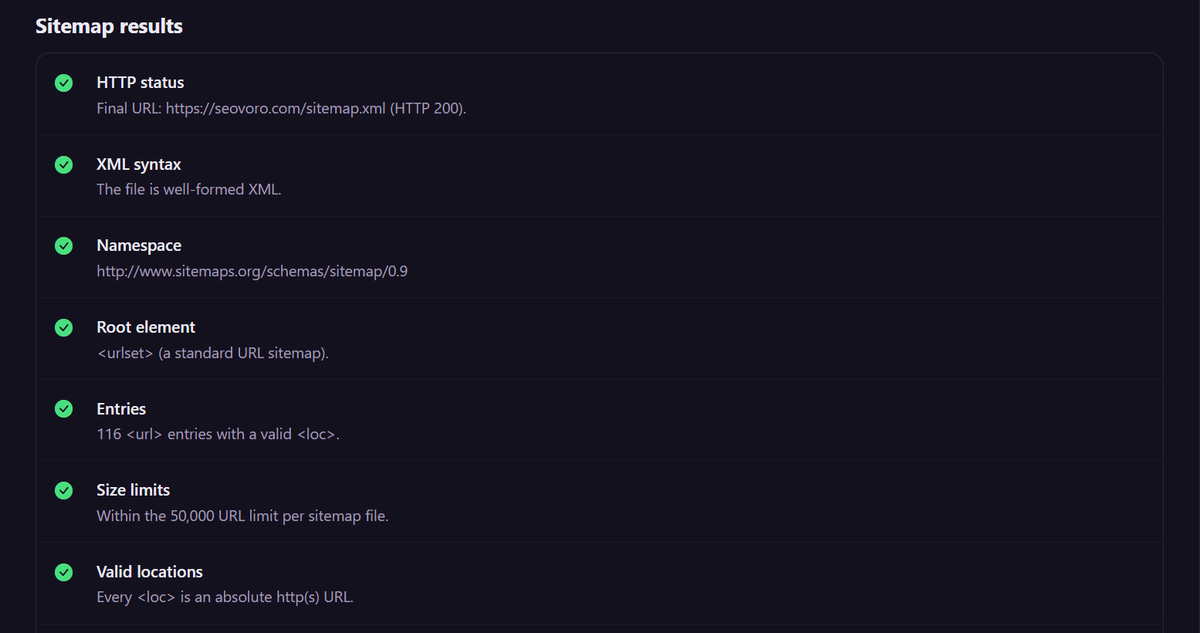
- Read the checks: XML syntax, namespace, number of entries, valid locations, host consistency, duplicates and date format.
- Look at the sample status codes the tool shows for your first URLs. They should return 200.
- Fix any problems and test again.
The validator checks the structure of the file. For a deeper review of crawling, indexing and canonical tags across your whole site, request a technical SEO audit.
How to submit your sitemap
- Add it to robots.txt. Add a line such as
Sitemap: https://yoursite.com/sitemap.xml. This helps every crawler find it. - Submit it in Search Console. Open Sitemaps, enter the sitemap address and click Submit. The report shows when it was read and how many pages were found. Google describes the steps in its guide to building and submitting a sitemap.
- Check the report later. Look for errors and compare the number of discovered pages with what you expect.
Frequently asked questions
Do I need an XML sitemap?
Not always. Small, well-linked sites can be crawled without one. A sitemap is still useful for new sites, large sites and sites with pages that are hard to reach through links.
Where should my sitemap be?
Commonly at the root of your site, for example /sitemap.xml. You can name it differently, as long as you submit it or list it in robots.txt.
Should every page be in the sitemap?
No. Include only pages you want indexed. Leave out redirects, error pages, noindex pages and duplicates.
Does a sitemap improve rankings?
Not directly. It helps search engines discover pages, but ranking depends on content quality, links and many other factors.
How often should I update my sitemap?
Whenever you add, remove or significantly change pages. Many sites generate it automatically.
Why does Search Console say pages are discovered but not indexed?
A sitemap only helps discovery. Google may still decide not to index a page, for example if it is a duplicate or offers little unique value. Improve the content and internal links, and review the Pages report.
Can I have more than one sitemap?
Yes. You can submit several sitemaps or a sitemap index that lists them.
Sources
- Google Search Central: Learn about sitemaps
- Google Search Central: Build and submit a sitemap
- Google Search Central: Manage sitemaps with a sitemap index file
Ready to check yours? Run the free Sitemap Validator or explore our SEO services.
Written by Seovoro SEO Team
SEO, AEO & AI Search specialists at Seovoro. View author profile